Compare & Merge Text
The fastest way to see changes between two blocks of text or code.
- let theme = "light";
initApp(theme);
+ const theme = "dark";
initApp(theme);
Why Choose DiffTools
Designed for precision and speed
Everything you need to compare, merge, and refine text — in one clean workspace.
How it works
Three steps to a clean diff
No account, no install, no waiting. Just paste, compare, and merge.
Paste your text
Add original and modified versions to the left and right panes.
Click Compare
Instantly see additions, deletions, and modifications highlighted.
Merge & copy
Accept the changes you want and copy the final result.
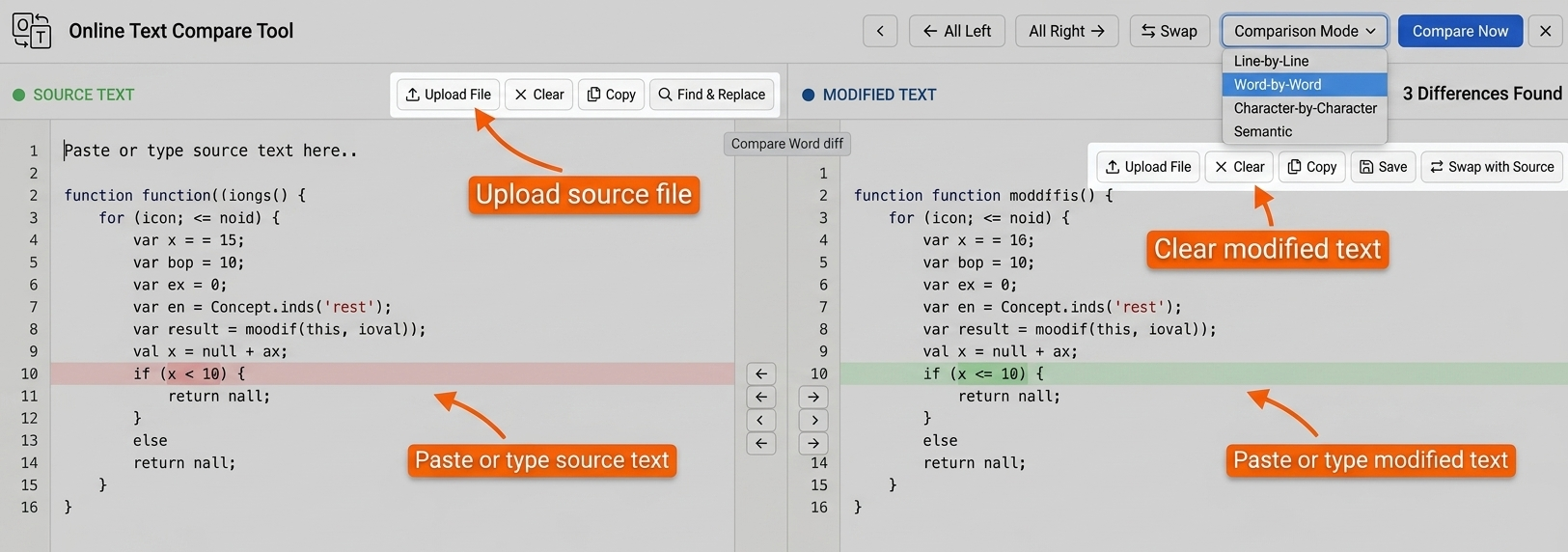
Visual guide
See the diff in action
A quick example of how changes are highlighted and merged.
Use cases
Built for every workflow
From code reviews to contract edits, the diff tool handles them all.
Code reviews
Compare two versions of a script, function, or config file before merging a pull request.
Document editing
Track what changed between drafts of a report, essay, or proposal without Track Changes.
Contract versions
Spot every clause addition or deletion between two contract drafts in seconds.
Config & JSON diff
Compare environment configs, JSON payloads, or CSV exports to diagnose issues fast.
Content updates
Audit exactly what copy changed on a page before and after a site update.
String comparison
Verify translation files match their source by diffing locale strings side by side.
FAQ
Frequently asked questions
Everything you need to know about the text comparison tool.
More free tools